Showing posts with label Prototyping. Show all posts

Saturday, December 28, 2013

Pencil Project - Tips and Trix

Have been using Pencil project to GUI prototype a project I'm working on. There is a lot of features that might be hard to find info about. Thought I write down a few tips I've found out.

PNG-files can be dragged and dropped in pencil project. When you do this you get a relative path from the project file to the PNG-file. So to make your pencil projects portable or to check in
to a repository make sure that all files that are dragged and dropped are in a sub folder to the project. If you forgot to do this and have moved the project add a sub folder and move all the resource files there and open the project in a text editor for example Notepad++ and change all pathes on the images in the project file.

Ctrl and click on several objects makes it possible to group the objects, this makes you life easy when there starts to be many objects in the design.


Clicking twice on an object makes it possible to rotate the object, by dragging the vertex in the corner.


Wednesday, April 24, 2013

Creating a Windows 8 Store App - Part 2


Before you can start building the application we need to design how the application will look like, and work. So lets create a GUI Prototype using the use cases in Part 1.

There are several tools for creating GUI prototypes, Microsoft SketchFlow are only available with Visual Studio Premium, because of that I will go with Pencil Project instead, it's a free open source project that works in a similar way.

Download and install Pencil Project.


Create a new Dokument.


Change page properties.


Change page size.

 OK, when to apply new size.

Use the Sketch Stencils, to get a sketchy look on the components.

We can now add a box, label and so on to create a layout of the application:

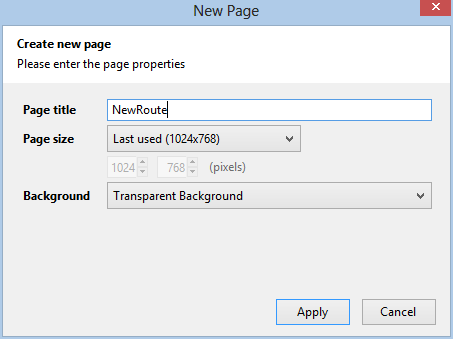
To add a New Page click on Add Page to handle New Routes click "New Page":


Add a descriptive name to the new Page:
 

 It's possible to add links between the pages by right clicking items and choose link to, so we add a link to the main page to return from the New Routes page:


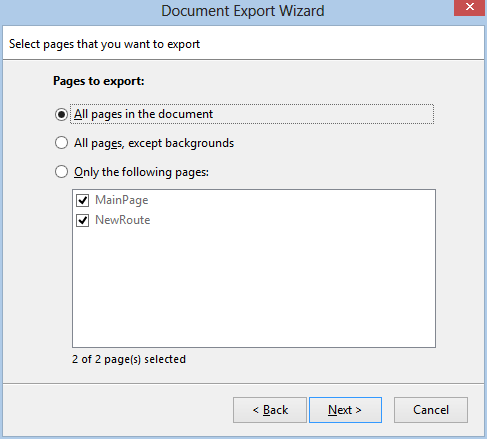
When the prototype is completed it's possible to export the document into different formats, so the people that is going to review the prototype dosen't need Pencil project installed: 


I choose web page because everyone has a web browser:


Export all pages:


Choose the output directory, I created a MyRoutesHTMLExport directory:


The result is a html page and resources:


The page show our prototype, and is clickable to jump between pages:


I will try detail the pages more in the next blog post.