
Showing posts with label Windows8. Show all posts

Wednesday, April 24, 2013

Creating a Windows 8 Store App - Part 2


Before you can start building the application we need to design how the application will look like, and work. So lets create a GUI Prototype using the use cases in Part 1.

There are several tools for creating GUI prototypes, Microsoft SketchFlow are only available with Visual Studio Premium, because of that I will go with Pencil Project instead, it's a free open source project that works in a similar way.

Download and install Pencil Project.


Create a new Dokument.


Change page properties.


Change page size.

 OK, when to apply new size.

Use the Sketch Stencils, to get a sketchy look on the components.

We can now add a box, label and so on to create a layout of the application:

To add a New Page click on Add Page to handle New Routes click "New Page":


Add a descriptive name to the new Page:
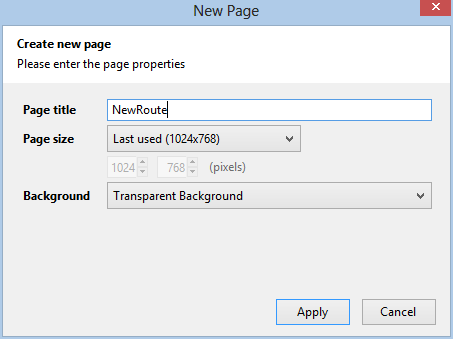
 

 It's possible to add links between the pages by right clicking items and choose link to, so we add a link to the main page to return from the New Routes page:


When the prototype is completed it's possible to export the document into different formats, so the people that is going to review the prototype dosen't need Pencil project installed: 


I choose web page because everyone has a web browser:


Export all pages:
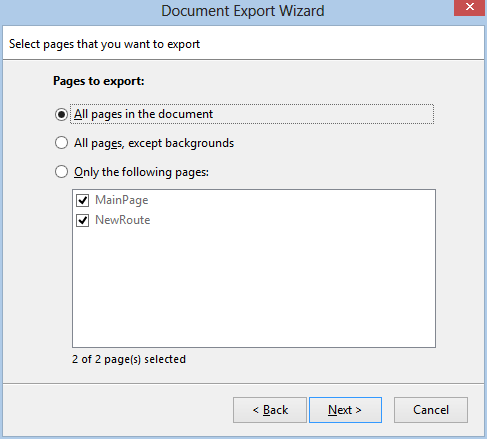

Choose the output directory, I created a MyRoutesHTMLExport directory:


The result is a html page and resources:


The page show our prototype, and is clickable to jump between pages:


I will try detail the pages more in the next blog post.


Sunday, April 14, 2013

Creating a Windows Store App - Part 1

I haven't done much blogging lately  but I will try to start again. I will make a few blog posts on how to create a Windows Store Application. The parts will be published when they are written so I can't promise how often it will be, because it depends on workload etc. But here we go:

Where do we begin? You need an application idea!

Let's say you are into riding bicycles, what kind of application do all cyclists need?
Well all cyclist needs to make sure that their friends and family knows where they going to ride their bike, so if the cyclist go missing because of an accident they know where to start looking. The application needs to help the bicyclist to do at least:
  • Add a route
  • Changing a route
  • Share a route
To outline the users needs, lets create a fictive user called John Bikealot. John 44 years old living with his wife and two kids. John is a everyday cyclist, commuting to work and does some extra cycling for exercise a few days a week.

How would Mr Bikealot want the "Add a route" feature to work?

He want to minimize the time spent adding routes, he like to ride his bike. So adding a route needs to be as simple as just naming the streets or clicking on a map. Because he will be riding his bike in the same area most of the time he doesn't what to add the same route more than once.

When and Why would Mr Bikealot want to change the route?

Having done training during the summer he starts feeling fresh in the legs late on the route, so extending the route with a detour on some new roads might be necessary to get the same time on the bike as he had early on the season. But he want to do this in a quick way not spending any unnecessary time in front of a computer.

How does Mr Bikealot want to share the routes with his family and friends?

The easiest way possible. Email or status by doing an update on Facebook perhaps.

Saturday, February 09, 2013

Solution when Windows 8 cannot shutdown

I got a problem on my laptop that I migrated to Windows 8. It could not shutdown. When choosing shutdown the computer ended up running the only way to shutdown was to press the hardware switch for a long time several timed forcing the computer to stop.

I've googled the problem and the solution is:

Right-click the lower left corner to get the power menu, click Power options:

Choose, "Choose what the power button do" in the left column:


Click "Change settings that are currently unavailable":


Uncheck "Turn on fast start-up":


And after this change the computer is possible to shutdown.
 

Sunday, September 18, 2011

Windows 8 and VS2011 developer previews.

Have been busy this weekend checking out the keynotes and some sessions from the Microsoft Build conference last week. Microsoft has released a windows 8 developer preview and a Visual Studio 2011, .Net4.5 developer preview. So I've installed both products. VS11 is included in the 64bit Win8 developer preview, but only the win 8 only features are available and if you install the vs2011 on win7 you can't use the win8 features, So I installed Win8 on Virtualbox see some notes on virtual environment and VS2011 on my win7 machine. I've have made some initial testing:
First Windows 8, the new metro style start page feels like it's spot on when using touch-screens. There is also a mouse and keyboard integration, I don't have touch-screen on my laptop, so I have only used the mouse and keyboard approach, it does not feel perfect though, specially in the metro style applications. In VS2011 you can build metro style applications using C++, C#/VB.Net and HTML/Javascript using the Windows Runtime API. The applications created can be suspended to save battery. A lot of the focus is to save battery time, The fact that Win8 will run on ARM devices, the web sockets support that will be built-in in IE10, IIS8, Windows Runtime Client SDK, .Net4.5...

VS2011 and .Net4.5, .Net4.5 is an in-place update of .Net4.0, that mean that there can be compatibility problems, so any applications built in 4.0 should be tested carefully and as early as possible to avoid problems. .Net4.5 has been made faster. VS2011, the productivity Tools has been integrated into VS2011 also there has been a lot of work done so tools can be used without the need to switch context from the editor. Expression Blend now includes support for HTML and CSS making it easy to use the same Product for all GUI stuff.