Saturday, September 08, 2012

How to: make sure windows doesn't go to sleep/hibernate

I'm currently working on support tools for an embedded system. When loading new software or loggning information from the system it takes a long time. Got feedback from the users that the tools act strange when their computers went to sleep and the they activate  the computer again. No errors indicated in the tools but it the log files look strange.

The problem can be solved in two ways:

  1. Turn off the sleep/hibernate in windows.
    1. Control panel
    2. System
    3. Power options
    4. Plan
    5. Put computer to sleep never.

      This is an easy fix but it is impossible to ensure that the users do this, and when they run into this problem it's already to late.
  2. Make sure the application tells windows it is going to run a long process, and that the user needs to wait for it to complete.

    See Stack Overflow question. http://stackoverflow.com/questions/629240/prevent-windows-from-going-into-sleep-when-my-program-is-running

    On XP See: WM_POWERBROADCAST

    On Vista and Windows 7 See: SetThreadExecutionState

    This is the path I think is correct by telling the operating system what the application is doing it supports the application and user does not have to do anything to get the correct behavior when logging or uploading software to the system.

Wednesday, April 04, 2012

SWENUG Sundsvall AppSlöjd with Microsoft.

It's been a while since my last blog post, but there has not been so much to write about. Have been busy working on a C++ project.

Yesterday I attended the AppSlöjd Event that was organized by SWENUG Sundsvall. It was an evening listening to Microsoft @Buzzfrog and @Grytlappen talking about app development on windows phone.

Got some info on stuff to check out:
migbi.se Swedish resources on windows phone.
MVVMLight Makes the infrastructure code in WP easier for MVVM-pattern
Wp7AdsRotator Makes it possible to include ads from several resources.
Live SDK Upload and download files to skydrive from windows phone.

Thursday, January 19, 2012

Version 2.4 of ESRI SL, WP7, WPF APIs is released.

Esri has released a new version 2.4 of their Microsoft .Net API:s for Silverlight, Wpf and Windows Phone, it's a version with bugfixes, so if your are running 2.3 check it out and upgrade here:

Silverlight:
http://help.arcgis.com/en/webapi/silverlight/index.html

Wpf:
http://help.arcgis.com/en/webapi/wpf/

WP7:
http://help.arcgis.com/en/arcgismobile/10.0/apis/windowsphone/

Also make sure you get the latest and greatest of the toolkits on codeplex:
http://esrisilverlight.codeplex.com/releases/view/80697

Friday, December 30, 2011

ESRI ArcGIS and websockets (XSockets) with Microsoft Kinect Beta 2 SDK

Connected the dots... combined yesterdays ArcGIS and kinect demo with my earlier ArcGIS and web sockets demo:


Merging these together makes it possible to update the extent of the ArcGIS API for JavaScript clients by making gestures in-front of the kinect device that is connected to the ArcGIS API for WPF application, the communication between the clients are made through web sockets and for that I've used XSockets:

Thursday, December 29, 2011

Using Kinect and ArcGIS for WPF

Integrated Kinect SDK Beta 2 with ArcGIS for WPF 2.3 to see how it's possible to control an application for map viewing using the kinect sensors.

Tested gesture detection using KinectToolbox and Microsoft Speech Platform SDK.

Made two demos, one panning using gesture detection:


The other demo using my voice to control panning and zooming:


Saturday, December 17, 2011

Silent installer using Nullsoft Scriptable Install System (NSIS)

When making installers it's important to make it possible to run the installer silently. This is a requirement if you want to include your installer in another installer. I've inherited some installers on my new job, these were made in Nullsoft Scriptable Install System (NSIS). We have a requirement to include several application installers into a package to make the installation easier for the end users, so I've looked into what needs to be done in NSIS to make the installers silent.

It turns out to be quite easy, see the chapter on silent installer/uninstaller in the documentation, all MessageBoxes in the script has the possibility to have a /SD parameter where you can set the default return value if the installer is running in silent mode /S. To reduce cluttering the start menu with uninstaller links it's possible to use the IfSilent statement to jump over the creation of uninstall links.

Friday, December 09, 2011

Testing WebSocket support in ASP.Net 4.5

I've followed the descriptions in Paul Batum blog post Getting started with WebSockets in the Windows 8 developer preview  to test websockets in ASP.Net 4.5. Notice that you can use the Express version of Microsoft Visual Studio 2011 to run the WebSockets samples. Also see the Building real-time web apps with WebSockets using IIS, ASP.NET and WCF session from the Build conference. The samples seems to working correctly, so I will try to port my XSocket with Esri ArcGIS for JavaScript demo to ASP.Net.


Sunday, October 16, 2011

error : The Web Application Project BasicAspNetChat is configured to use IIS. Unable to access the IIS metabase. You do not have sufficient privilege to access IIS web sites on your machine.

Got this error:
error : The Web Application Project  is configured to use IIS. Unable to access the IIS metabase. You do not have sufficient privilege to access IIS web sites on your machine.

Resolution: 
Restart Visual Studio 2011 and run as administrator.

Sunday, October 02, 2011

CodeCamp, Map collaboration using XSockets with ArcGIS For Javascript

This weekend I've been to the XSockets CodeCamp i Sundsvall Sweden. Listening to Magnus Thor and Ulf Björklund talking about XSockets that is a websocket server that can be used to create real time web applications.

Robert Friberg held an interesting talk about liveDB an in-memory database that can be used to speed up development and handle high load applications. Basically hack away in .Net and you don't need any OR-mapper to work with the data storage.

But we did more then just listening, almost the whole Friday night was used to do hands-on coding with XSockets. My group made stunning demos for a real time soccer result live feeds web application. On Saturday I decided to use my GIS knowledge to try something different, so I hacked away on making a realtime map extent update application using ArcGIS for Javascript API. The result can be seen in this youtube clip. I will update this blog post with the details as soon as can, so stay tuned..


Step by step description on how to set up the project:

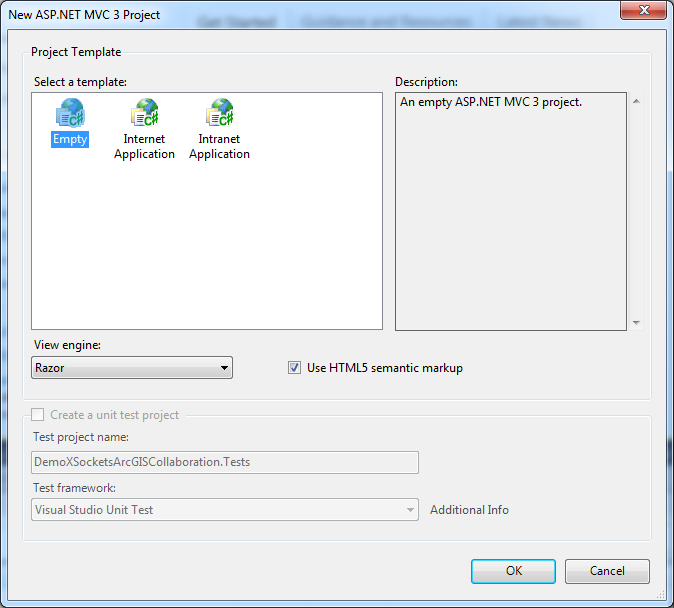
First create a project in VS2010. I create a MVC3 web project:


Create using empty template:


Use NuGet to get XSockets package:

>Install-Package XSockets


It adds resources to our project and create two projects for the XSockets server.


Create a html page in the root of the web application project:


I copy some boilerplate code from the show extent sample to the html page replacing the default code and added the web sockets code, so add the code below into your file:


Add a new handler using Scaffolding by writing:

>Scaffold XSocketHandler MyDemoHandler MyDemoClass


This creates a new strongly typed XSocketHandler in the XSocketHandler project:

Add code that returns the extent back to the other clients:


Do rebuild solution and check so there are no build errors.

Start the XMaxiSocketServer by right clicking the project and choose:
Debug | Start new instance

Choose allow when firewall ask this:


Open the MapClient.html page by right clicking the file choosing:
View in browser (should work if you have a web socket enabled browser Crome/Safari)

Answer no on the question:
And yes on the question:


Copy the address and start a new browser, when panning and zooming the maps in one browser it  should follow on the other browser, see youtube clip.