Esri has released a new version 2.4 of their Microsoft .Net API:s for Silverlight, Wpf and Windows Phone, it's a version with bugfixes, so if your are running 2.3 check it out and upgrade here:
Silverlight:
http://help.arcgis.com/en/webapi/silverlight/index.html
Wpf:
http://help.arcgis.com/en/webapi/wpf/
WP7:
http://help.arcgis.com/en/arcgismobile/10.0/apis/windowsphone/
Also make sure you get the latest and greatest of the toolkits on codeplex:
http://esrisilverlight.codeplex.com/releases/view/80697

Showing posts with label ArcGIS. Show all posts
Showing posts with label ArcGIS. Show all posts
Thursday, January 19, 2012

Friday, December 30, 2011
ESRI ArcGIS and websockets (XSockets) with Microsoft Kinect Beta 2 SDK
Connected the dots... combined yesterdays ArcGIS and kinect demo with my earlier ArcGIS and web sockets demo:

Merging these together makes it possible to update the extent of the ArcGIS API for JavaScript clients by making gestures in-front of the kinect device that is connected to the ArcGIS API for WPF application, the communication between the clients are made through web sockets and for that I've used XSockets:

Merging these together makes it possible to update the extent of the ArcGIS API for JavaScript clients by making gestures in-front of the kinect device that is connected to the ArcGIS API for WPF application, the communication between the clients are made through web sockets and for that I've used XSockets:
Saturday, May 14, 2011
Using NuGet to package ArcGIS WPF references.
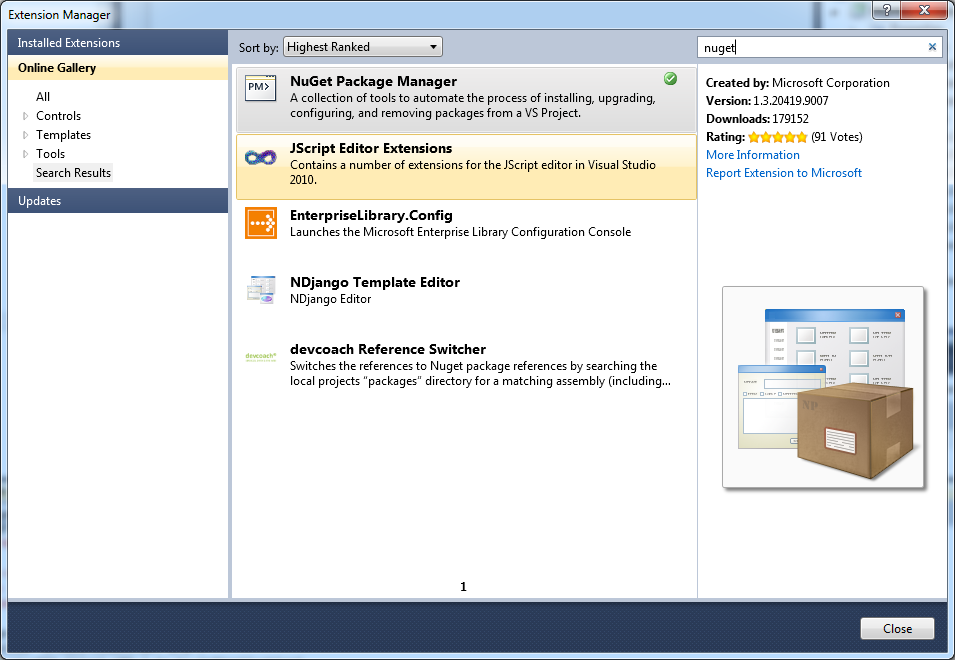
Tested to use NuGet to create a package of the ArcGIS WPF APIs. Installed NuGet Package manager using extension manager in VS2010.

Installed the NuGet Package Explorer and created a package called ArcGIS.Client.WPF and added content, lib, framework and DLLs in the correct framework. Saved the package to a *.nupkg fil in a local folder C:\NUGet\Packages

To get make the package available to NuGet I added the folder in VS2010, Tools | Library Package Manager | Package Manager Settings


Now it's possible to use the package from a project, after starting a WpfProject in VS2010 I start up the consol by choosing, Tools | Library Package Manager | Library Package Console

when the console window opened up it's possible to choose the local folder that we added to the settings

Now it's time to install the package in the project, this is easy, only need to write install-package ArcGIS.Client.WPF and the package gets installed:

References to the package gets added to the project:

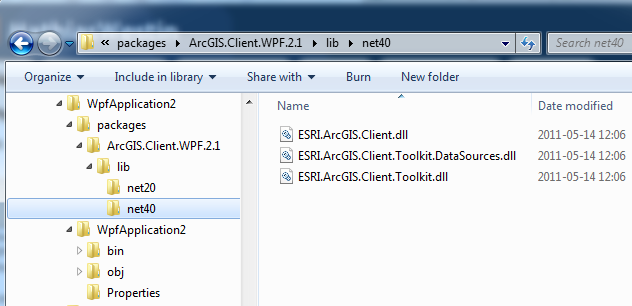
If we take look in explorer where the package ended up the filsystem looks like this:

So what's does all this mean, well you can create you own packages that can be easily be added in your projects. This makes it easier to handle dependencies and upgrades. There is a lot of packages on the NuGet Gallery but if you are missing a package or have internal DLL NuGet makes it easy to handle all external dependencies in your projects.
Installed the NuGet Package Explorer and created a package called ArcGIS.Client.WPF and added content, lib, framework and DLLs in the correct framework. Saved the package to a *.nupkg fil in a local folder C:\NUGet\Packages

To get make the package available to NuGet I added the folder in VS2010, Tools | Library Package Manager | Package Manager Settings


Now it's possible to use the package from a project, after starting a WpfProject in VS2010 I start up the consol by choosing, Tools | Library Package Manager | Library Package Console

when the console window opened up it's possible to choose the local folder that we added to the settings

Now it's time to install the package in the project, this is easy, only need to write install-package ArcGIS.Client.WPF and the package gets installed:

References to the package gets added to the project:

If we take look in explorer where the package ended up the filsystem looks like this:
So what's does all this mean, well you can create you own packages that can be easily be added in your projects. This makes it easier to handle dependencies and upgrades. There is a lot of packages on the NuGet Gallery but if you are missing a package or have internal DLL NuGet makes it easy to handle all external dependencies in your projects.
Saturday, February 20, 2010
Combobox i verktygsfält i ArcGIS Engine eller implementera IToolControl.
När man bygger verktyg för ArcGIS Engines verktygsfält, så kan man utgå från dom templates som installeras i visual studio enligt konceptet som finns beskrivet här: http://resources.esri.com/help/9.3/ArcGISEngine/dotnet/0bf044f6-dbcd-4d04-836e-3b5e47204818.htm.
Men ibland så vill man ju ibland göra lite mer avancerade saker. T.ex så kan man vara i behov av att lägga in en combobox i verktygsfältet. För att få det att fungera så krävs det lite mer kodning, man måste implementerar interfacet ICommand eller ITool (ifall man vill ha ett verktyg med tillgång till displayen) istället för basklasserna. Samt ärva från en System.Windows.Form.Combobox. Utöver detta så krävs det även att man implementerar interfacet IToolControl se http://resources.esri.com/help/9.3/ArcGISEngine/arcobjects/esrisystemui/itoolcontrol.htm. Esri beskriver här hur man måste göra för att knyta kontrollen till verktygsfältet. Handle referensen till comboboxen måste exponeras vid implemenation av interfacet.
Men ibland så vill man ju ibland göra lite mer avancerade saker. T.ex så kan man vara i behov av att lägga in en combobox i verktygsfältet. För att få det att fungera så krävs det lite mer kodning, man måste implementerar interfacet ICommand eller ITool (ifall man vill ha ett verktyg med tillgång till displayen) istället för basklasserna. Samt ärva från en System.Windows.Form.Combobox. Utöver detta så krävs det även att man implementerar interfacet IToolControl se http://resources.esri.com/help/9.3/ArcGISEngine/arcobjects/esrisystemui/itoolcontrol.htm. Esri beskriver här hur man måste göra för att knyta kontrollen till verktygsfältet. Handle referensen till comboboxen måste exponeras vid implemenation av interfacet.
Saturday, February 13, 2010
Utskriftskommando i ArcGIS Engine.
Hittade en beskrivning av hur man skulle göra ett kommando för att skriva ut activeview i ArcGIS Engine http://resources.esri.com/help/9.3/ArcGISEngine/dotnet/025b5da7-9b10-4623-a51e-c038c348ce29.htm, gjorde en applikation och försökte få igång exemplet, men vänta det ska skickas in en hook-instans till kommandot, http://edndoc.esri.com/arcobjects/9.2/ComponentHelp/esriControls/HookHelper.htm vad är det?
Jo det är ESRIs sätt att skicka med information om kartkomponenterna till ett kommando. Hittade en kanonbra beskrivning av detta på esri:s developer blogg: http://blogs.esri.com/Dev/blogs/arcgisenginedevelopment/archive/2008/05/05/How-can-I-use-my-custom-command-in-Engine-without-using-the-ToolbarControl_3F00_.aspx, bra att veta hur man använder om man vill skapa sin egen kommandohantering.
Jo det är ESRIs sätt att skicka med information om kartkomponenterna till ett kommando. Hittade en kanonbra beskrivning av detta på esri:s developer blogg: http://blogs.esri.com/Dev/blogs/arcgisenginedevelopment/archive/2008/05/05/How-can-I-use-my-custom-command-in-Engine-without-using-the-ToolbarControl_3F00_.aspx, bra att veta hur man använder om man vill skapa sin egen kommandohantering.
Wednesday, September 30, 2009
IronPython
Tittar lite på dynamiska språk, verkar som att Python kommer bli standarden i ESRIs produkter i framtiden, åtminsone pekar man på avsikterna i detta dokument http://downloads2.esri.com/support/TechArticles/ArcGIS_931_and__94_Deprecation_Plan.pdf Sprang på ett bra genomgång av vad som är nytt i VS2010 http://www.msdev.com/Directory/Description.aspx?eventId=1271 där man bla berättade om dom dynamiska språken IronPython och IronRuby som .Net stödjer via DLR Dynamic Language Runtime som ligger som en smet över CLR. Testade att installera och köra lite IronPython. Installationen hittar man här http://ironpython.codeplex.com/ en bra tutorial finns här http://docs.python.org/tutorial/ om man vill lära sig att använda språket. Obesrvera att man kommer åt alla klassbibliotek i .Net från IronPython vilket innebär att man inte är begränsad på något sätt när man använder dom dynamiska språken.
Subscribe to:
Posts (Atom)