Wednesday, August 26, 2015

Solved: Error: this template attempted to load component assembly 'Microsoft.VisualStudio.Universal.TemplateWizards...

I got this error message:


when trying to create a Background Application (IoT) project in Visual Studio 2015:


When reading through the setup guide http://ms-iot.github.io/content/en-US/win10/SetupPCRPI.htm an extra time I found out that I've missed installing this when installing Visual Studio 2015:

The required version of Visual Studio Tools for Universal Windows Apps is 14.0.23121.00 D14OOB.

I click on the Templates | Visual C# | Windows | Universal
and from there I installed the templates and after that the error message when creating a background application disappeared.

Tuesday, August 25, 2015

Raspberry PI 2 and Windows 10 IoT Core

Have been playing around with an Raspberry Pi 2 and Windows 10 IoT Core.


There is a great guide on how to prepare your PC and Raspberry Pi 2 with windows 10 IoT Core here https://ms-iot.github.io/content/en-US/win10/SetupRPI.htm following the guide is easy. But I don't get the requirement for Windows 10 to be able to flash the image to the memory card. But off course to be able to develop you need Windows 10 and Visual Studio 2015.

Installed Visual Studio 2015 Community and the IoT Templates. Described here https://ms-iot.github.io/content/en-US/win10/SetupPCRPI.htm

I tried to get the wifi up and running but windows 10 IoT Core seems to only support some USB wifi dongles https://ms-iot.github.io/content/en-US/win10/SetupWiFi.htm So ended up using ethernet cable.

A good advice is to change the default password. So I did that in the a first Powershell session following the setup guide:
net user Administrator [new password]

By starting the Windows IoT Core Watcher on a desktop PC that are on the same network. It's possible to see all Raspberry Pi 2 devices running on the network

By right clicking the item it's possible to open the website on the Raspberry Pi 2 <ip-adress>:8080.

Monday, August 24, 2015

Visual Studio Online

Microsoft Visual Studio Online makes it possible to have an online ALM. Each Project can have 5 basic users and unlimited amount of stakeholder users.

I made an presentation for our user group a few month ago. Posted on Slideshare.net: http://www.slideshare.net/MathiasWestin/knowit-study-group-rnskldsvik-introduction-to-visual-studio-online

Friday, March 06, 2015

Installing NAPA Office 365 Development Tools

There is a great instruction on how to install the NAPA Development Tools here:
https://msdn.microsoft.com/en-us/library/office/fp179924%28v=office.15%29.aspx

After installing it's possible to create Apps in NAPA that can be published in the Sharepoint App Store.
 
It's possible to create several different app types:

NAPA has a editor where the code can be edited online:

Introduction to Microsoft Azure websites

Have been watching a lot of online courses last month on Microsoft Virtual Academy on the cloud track on Know It Prove It.

The fundamentals courses by Bob Tabor:
http://www.microsoftvirtualacademy.com/training-courses/microsoft-azure-fundamentals
http://www.microsoftvirtualacademy.com/training-courses/microsoft-azure-fundamentals-websites
showed how easy it is to set up and configure a Microsoft Azure website.

Made a short introduction presentation for our Study group to inspire other developers to start using Azure when doing web development. For those who are interested it's published the presentation on:
http://www.slideshare.net/MathiasWestin/knowit-study-group-rnskldsvik-introduction-to-microsoft-azure-websites

Thursday, February 26, 2015

How to make web site running IIS Express accessible from a Raspberry Pi 2

I wanted to build a web site that is used by a Raspberry Pi 2 from Visual Studio without hosting the site in an IIS.

Was following the following this guide:
http://www.hanselman.com/blog/WorkingWithSSLAtDevelopmentTimeIsEasierWithIISExpress.aspx

Got some errors, though it could be great for my own memory to write down the steps nessessary:

First step: Edititing the applicationhost.config:


Change "localhost" to the ip-number of the machine running the IIS Express (can be found by using command netconfig in the command prompt) ip-number is for example 192.168.1.2:


Second step: Tell HTTP.SYS that everybody has access to the url:

netsh http add urlacl url=http://myhostname:58763/ user=everybody


If Everything works you get:
URL reservation successfully added


"everybody" needs to be "alla" in a swedish machine otherwise you get the following error message:

Create SDDL failed, Error: 1332 Felaktig parameter.


If you like me forget the / in the url that is write http://myhostname:58763 without trailing / you get the following error message:

Url reservation add failed, Error: 87 Felaktig parameter.


Third step: add an exception in the firewall:

netsh advfirewall firewall add rule name="IISExpressWeb" dir=in protocol=tcp localport=58763 profile=private remoteip=localsubnet action=allow


If Everything works you get:

Ok.


If running the IIS Express from Visual studio you need to run as administrator, otherwise you get an error message that say you need to run as an administrator.

Check that you can access the machine running the IIS Express by entering ping 192.168.1.2 in the command prompt in Raspberry pi. If you can access the machine, start the web browser and enter http://192.168.1.2:58763 in the adress.

Now its possible to access the site.

Sunday, February 01, 2015

Testing f.lux that adjust color temperature of the display

Trying out a tool called f.lux that adjust the color on the computer screen so that the eyes don't get tired so fast when working late evening/night. I found the tool in Scott Hanselman:s ultimate tool list so thanks for sharing. Worth trying out when working late during the winter month. I must admit that I've started adjusting the brightness on the phone and surface after using f.lux a while, because I felt the brightness was too bright for my eyes.

Saturday, November 29, 2014

.Net 4.5 Async Await for a more responsive design

Writing this so I'll remember the details. There is a good resource on the Await and Async keywords in MSDN: http://msdn.microsoft.com/en-us/library/hh191443.aspx

The key thing is that the execution is released back to the event loop until the async method is executed and completed. So there is no blocking of the event loop causing rendering problems in the GUI.

There is a lot of arrows in the sample in MSDN but the summary is that code will go back and resume executing the "continuation" after the async method has completed. This is great for long-running processes like downloading resources.

Saturday, November 22, 2014

Installing the Android Studio Beta

Google is moving to new IDE, Android Studio. it's only in Beta right now but when released it will be the preferred IDE and you will need to merge from Eclipse.

You have to install the java development kit 6 (JDK 6) the 32-bit and the 64-bit version, it that can be found here: http://www.oracle.com/technetwork/java/javase/downloads/index.html

Installer for the Android Studio can be downloaded here http://developer.android.com/sdk/installing/studio.html
Unzip

After installing the Android studio you have to add the JDK JAVA_HOME Environment variable setting if the installer script failed to do so, follow the instructions on the site. (the path should be to 32-bit or 64-bit depending on if studio.exe or studio64.exe will be used)

Also install the Android SDK, by downloading "Get the SDK for an existing IDE" http://developer.android.com/sdk/index.html Start the SDK Manager and download according to the instructions on the web site.

Start the Studio.exe in the Android Studio unzipped folder. Set the path to the Android SDK by clicking configure | project setting | project platform and setting the path.


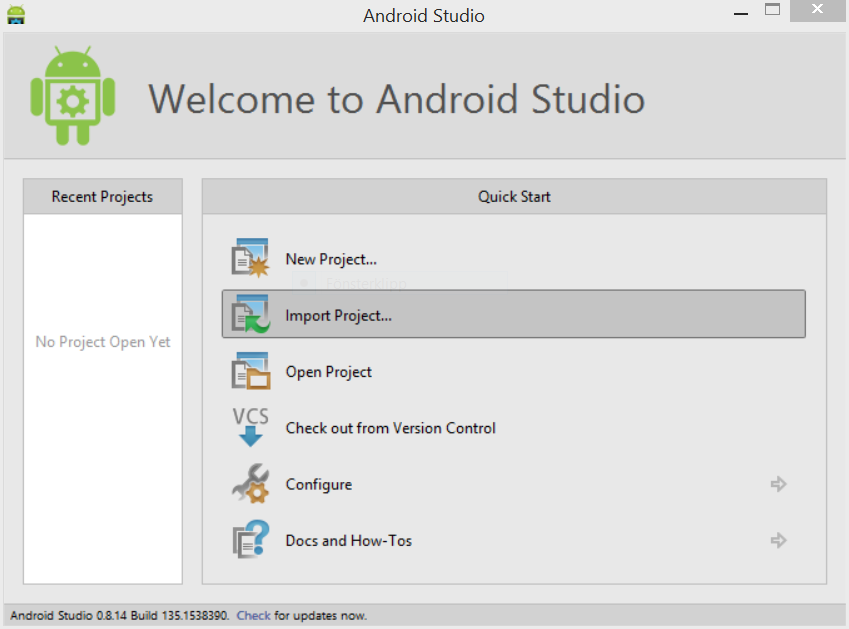
Now you will be able to start a New project... By creating a project you start the IDE:


Found a tutorial that describe the Android Studio here: http://youtu.be/bJ_2_AQboc0

The UX when installing the Android Studio is really bad, hopefully it will be a lot easier to install with all the dependencies when released.

Sunday, November 02, 2014

Compiling Qt code gave: multiple definition of ...

Got an error when compiling our code:

In Windows 7 and visual studio, I at first did not notice the problem, but it was giving a warning:
LNK4042: object specified more than once; extras ignored

In Linux and gcc it gave an error, so I could not compile the code:
multiple definition of `<constructor of class>'
collect2: ld returned 1 exit status

I took som time to figure it out, but turned out to be a bad merge in subversion, 
the *.pro file had the same class twice in

HEADERS += \ Class1.h /
                         Class1.h
SOURCES += \ Class1.cpp /
                         Class1.cpp

Rremoving the second time the class name where entered in the *.pro file solved the problem. See http://stackoverflow.com/questions/4722400/qt-compiler-warning-overriding-commands-for-target-ignoring-old-commands-for 

Friday, October 03, 2014

Been to a lunch seminar about Internet of Things

Went to Sogeti Internet of Things seminar on Wednesday lunch.
I made some notes:

Presenter was: @dagpetersson  

Devices:
  • Electric IMP. Computer, WiFi, inputs for sensors. Very small.
  • iBecon. Localication, triangulation, water resistant.
  • LightBlue Bean. Test card, Temperature sensor, Accelerometer, iBecon. In and output.

IBM MessageSight, uses MQTT protocol. Can support up to 1 miljon devices.

We where also able to test Google glass, very interesting experience.  

Thursday, October 02, 2014

Qt and collect2 ld returned exit status 1

Got this error when building a unit test project:
collect2 ld returned exit status 1

The linker complained on my newly added class in the implementation project.

It took a while to figure it out, but the problem was that the old *.so file was left in Build folder when I tried to compile the lib file that was used by the unit test project.

The solution to the problem was to remove all files in the implementation project build folder. Followed by a rebuild of the implementation project and unit tests project could be built without any linker errors.

Sunday, September 21, 2014

Use Pomodoro Technique and instrumental music to get into the zone quickly

Was listening to Mark Seeman on .Net Rocks, talking about Getting into the zone.

Got some good advice's, Instrumental music tends to be better to listen to than lyrics or someone is talking when trying to get "into the zone" or flow.
I usually had a podcast or a radio station on while working. But I get it now, listening and processing when someone is talking and in the same time as I'm working with my brain is reducing the mental performance. After changing to classical or instrumental music in my playlist at work, I can feel that it's faster to get into coding quicker when interrupted.

I also picked up the Pomodoro technique mentioned in the show, after reading up on the technique developed by Francesco Cirillo and setting a timer on 25 minutes when working and 5 minutes of rest between every "pomodoro"/work session, I can say it works for me, getting more done every day.

Saturday, September 06, 2014

Solved: error: C2248: 'QObject::QObject' : cannot access private member declared in class 'QObject'

Added two classes A and B both inheriting QObject.

#include <QObject>
#include "b.h"

class A : public QObject
{
    Q_OBJECT
public:
    explicit A(QObject *parent = 0);

    QList<B> doStuff();

signals:

public slots:


};


#include <QObject>

class B : public QObject
{
    Q_OBJECT
public:
    explicit B(QObject *parent = 0);


signals:

public slots:

};

But when adding implementation for A:

QList<GUIContainer> A::doStuff()
{
    QList<B> list;
    return list;

}


The compiler started complaining:
error: C2248: 'QObject::QObject' : cannot access private member declared in class 'QObject'


It complains because:
"The values stored in the various containers can be of any assignable data type. To qualify, a type must provide a default constructor, a copy constructor, and an assignment operator."
http://qt-project.org/doc/qt-4.8/containers.html


Solved the error by changing the QList to be a list of QSharedPointer:
QList<QSharedPointer<B> > doStuff();


Sunday, August 31, 2014

How to find out if a shared library has Debug symbols

We had some problems with debugging on a remote system and did some searching on the Internet to find out how to ensure that the library indeed has debug information. 

This is the command that can be used:
objdump --syms ... | grep debug

http://stackoverflow.com/questions/3284112/how-to-check-if-program-was-compiled-with-debug-symbols

Tuesday, August 26, 2014

Solved: Failed to start program. Path or permissions wrong?

Got this error in Qt: "Failed to start program. Path or permissions wrong?" after adding a new drive in our linux developer image in VM-Ware and moving our trunk to it. According to a lot of resources on the Internet the cause should be that the user don't have execute permission. But the user did and there were no difference when using root.

Found out that it was possible to check if mount was set to: noexec by using mount command and it was noexec although according to the GUI in mountmanager it was exec.
http://forum.softpedia.com/topic/980864-probleme-cu-permisiuni-folder/

Found out that this issue could be solved by doing a remount:
sudo mount -o remount,exec /tmp
http://askubuntu.com/questions/311438/how-to-make-tmp-executable

After the remount the error disappeared.

Thursday, August 21, 2014

SIGSEGV horror in the Qt project.

Had some problems in our project the application kept crashing with SIGSEGV error. We did not get a chance to catch the problem in the debugger making it hard to find. Found a neat trick on the internet, it's possible to add a handler for signals that catch the SIGSEGV and can print the stacktrace:
http://stackoverflow.com/questions/77005/how-to-generate-a-stacktrace-when-my-gcc-c-app-crashes

#include <stdio.h>
#include <execinfo.h>
#include <signal.h>
#include <stdlib.h>
#include <unistd.h>


void handler(int sig) {
  void *array[10];
  size_t size;

  // get void*'s for all entries on the stack
  size = backtrace(array, 10);

  // print out all the frames to stderr
  fprintf(stderr, "Error: signal %d:\n", sig);
  backtrace_symbols_fd(array, size, STDERR_FILENO);
  exit(1);
}

void baz() {
 int *foo = (int*)-1; // make a bad pointer
  printf("%d\n", *foo);       // causes segfault
}

void bar() { baz(); }
void foo() { bar(); }


int main(int argc, char **argv) {
  signal(SIGSEGV, handler);   // install our handler
  foo(); // this will call foo, bar, and baz.  baz segfaults.
}

It's also possible to catch other signals:
http://qt-project.org/doc/qt-4.8/unix-signals.html

Saturday, August 09, 2014

Qt connect is complaining that it can't find slot in super class when connecting sub class

Got an runtime error in the Qt application we are building, were connecting a signal with a slot, but when running the app we got this error message in the console:
Object::connect: No such slot mgccis::web::SuperClassWebservice::onReadyRead() in ServiceInterface\SubClassWebservice.cpp:37

The connect code in the SubClassWebservice looked like this:

connect(httpPost_parameterData_.data(), SIGNAL(readyRead()), this, SLOT(onReadyRead()));

There was a slot in the subClassWebservice, took a google search session to find out the real problem, found this on Stackoverflow:
http://stackoverflow.com/questions/4322224/qt-slots-and-inheritance-why-is-my-program-trying-to-connect-to-the-parent-inst

I've forgot to add the Q_OBJECT in the class declaration of the sub class.

Thursday, July 31, 2014

Change color on SVG item in Qt

This is a neat trick that can be good to know, found the solution in StackOverflow:
http://stackoverflow.com/questions/15123544/change-the-color-of-an-svg-in-qt/15124080#15124080

If you have for example an arrow that needs to be in different colors at different times in a Qt application, it's possible to change the color of an SVG item instead of adding several SVG items with different colors. 

QColor weightOutreachSupportArrowHorisontalColor = getWeightOutreachSupportArrowHorisontalColor();
yAxisIndicator_ = QSharedPointer<QGraphicsSvgItem>(new QGraphicsSvgItem(":/Icon/Icon/Arrow_x_30_30.svg",0));
QGraphicsColorizeEffect* weightOutreachSupportArrowHorisontalColorEffect = new QGraphicsColorizeEffect();
weightOutreachSupportArrowHorisontalColorEffect->setColor(weightOutreachSupportArrowHorisontalColor);
yAxisIndicator_->setGraphicsEffect(weightOutreachSupportArrowHorisontalColorEffect);
yAxisIndicator_->setZValue(100);
yAxisIndicator_->rotate(90);
yAxisIndicator_->setVisible(false);

scene_->addItem(yAxisIndicator_.data());

Monday, July 28, 2014

How to in Qt *.Pro-file disable: warning: C4996: 'sscanf': This function or variable may be unsafe. Consider using sscanf_s instead. To disable deprecation, use _CRT_SECURE_NO_WARNINGS. See online help for details.

Got a compiler error when using sscanf in QT Creator:
warning: C4996: 'sscanf': This function or variable may be unsafe. Consider using sscanf_s instead. To disable deprecation, use _CRT_SECURE_NO_WARNINGS. See online help for details.

To make sure other warnings wont't disappear in the spam like messages caused by the c++ compiler, we wanted to disable the warning.

Tried to do add this at the top of the main.cpp file but got the same error:
#define _CRT_SECURE_NO_WARNINGS

Adding this in the *.PRO file did the trick:

#Removes: warning: C4996: 'sscanf': This function or variable may be unsafe. Consider using sscanf_s instead. To disable deprecation, use _CRT_SECURE_NO_WARNINGS. See online help for details.
win32:{
    DEFINES +=  _CRT_SECURE_NO_WARNINGS
}