Showing posts with label Värt att Veta. Show all posts

Saturday, November 29, 2014

.Net 4.5 Async Await for a more responsive design

Writing this so I'll remember the details. There is a good resource on the Await and Async keywords in MSDN: http://msdn.microsoft.com/en-us/library/hh191443.aspx

The key thing is that the execution is released back to the event loop until the async method is executed and completed. So there is no blocking of the event loop causing rendering problems in the GUI.

There is a lot of arrows in the sample in MSDN but the summary is that code will go back and resume executing the "continuation" after the async method has completed. This is great for long-running processes like downloading resources.

Wednesday, August 31, 2011

The breakpoint will not currently be hit. no executable code is associated with this line... VS2008

Was trying to debug a ASMX web service in VS2008. But the breakpoint was not hit and when hovering over the breakpoint it said:
The breakpoint will not currently be hit. no executable code is associated with this line...
did some googling on the topic and guess what: Toggle to release and back to debug again does the trick! Writing it down in case I stumble into this again.

Wednesday, June 29, 2011

Setting file security in IIS 7.

Had some problems when migrating a web service to run on Windows 2008 R2 and IIS 7.5. Two of the asmx interfaces needed to have their own file security settings. I could not figure it out but googled it a bit and found the answer in StackOverflow:
1.In IIS7, browse to the directory containing your public.asmx and private.asmx files.
2.The title at the top will reflect the current directory, like "WebService Home". Click the "Content View" button at the bottom.
3.Right-click on your public.asmx file and choose "Switch to Features View".
4.The title should be "public.asmx Home" to confirm that you're managing the one file.
5.Add your IP restrictions. In this case, I think you want an Allow entry for 127.0.0.1 and choose "Edit Feature Settings" from the Action menu to Deny access to unspecified clients.
6.Click your containing folder again (e.g. WebService) and switch to Content View again to repeat these steps on private.asmx.

Very strange UX!?!

Tuesday, February 01, 2011

VS ger felmeddelande "Could not load file or assembly..." på 64bit maskin

Råkat ut för det här felmeddelandet några gånger nu "Could not load file or assembly..." Bloggar om detta så jag kanske kommer ihåg det tills nästa gång.

Får man felmeddelandet "Could not load file or assembly... " när man kör igång en applikation på en 64bitars maskin. Så kan det bero på att man refererar 32 bitars DLL:er i projektet. Om VS är satt på att bygga för "Any CPU" i Configuration Manager, så får man detta felmeddelande. Sätter man om projektet till att bygga "x86" istället så går det att köra projektet, detta gör man genom att lägga till "new" i solution plattform i Configuration manager.

Sunday, January 16, 2011

error : Whitespace is not allowed after end of Markup Extension.

Ibland får man knepiga fel som man inte direkt förstår vad dom beror på. Sitter och går igenom Hands On Labbarna för Windows Phone 7. Fick felet "error : Whitespace is not allowed after end of Markup Extension." när jag byggde projektet efter att ha suttit och matade in lite XAML kod i VS2010. Hittade felet till sist det beror på att man råkat slå in ett mellanslag i ett attribut:

 <StackPanel Orientation="Vertical" Width="{Binding Width, ElementName=View} ">  

Skall vara:

 <StackPanel Orientation="Vertical" Width="{Binding Width, ElementName=View}">  

Wednesday, January 12, 2011

Error: Name 'InitializeComponent' is not declared.

Satt och labbade lite med Prism och konverterade Hello World exemplet från C# till VB.Net. När jag fick problem med felmeddeladet "Error: Name 'InitializeComponent' is not declared." visade sig ha med Namespace bytet jag gjort i klassen.

Tänkte att det kan vara en idé att berätta att det finns en lösning för det ifall någon annan råkar ut för samma problem någong gång, se isf detta inlägg på Silverlight forumet: http://forums.silverlight.net/forums/p/91690/211761.aspx

Sunday, October 31, 2010

Använda SketchFlow och ArcGIS Silverlight/WPF Web APIs

Jag har kollat på möjligheterna att använda ArcGIS Silverlight/WPF Web APIs i SketchFlow för att göra GIS prototyper. Det känns som att det blir lite mer komplext att bygga en prototyp, men så här kan man iaf göra om man vill.

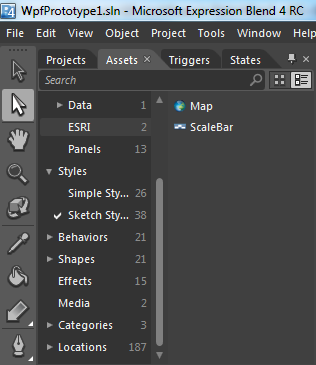
ESRIs komponenter läggs till i SketchFlow när man installerar API:erna. Vill man lägga till ett bagrundslager så kan man lägga till en karta:


Sen lägga till ett bagrundslager via egenskaper:

Observera att det finns möjlighet att välja flera olika "data källor":

Genom att välja ett tiled layer så går det att koppla upp sig mot bakgrundslager via arcgis.com:


Det går även att lägga till grafiklager och skapa geometrier i detta via AXML editorn:


Som sagt lite mer komplext och knyter sig till ESRIs produkt för Silverlight/WPF för att skapa sin prototyp, vilket kan ha sina för- och nackdelar.

Skapa skissaktiga knappar för SketchFlow

Ej GIS specifikt. Men vill man lyxa till det och lägga in ett verktygsfält med skissliknande knappar, så hittade jag ett tips på StackExchange: Import current UI into sketchflow som mha Paint.Net låter dig skapa skissliknande knappar från t.ex. knapparna som ska användas i rätta projektet.
Detta görs genom att öppna en bild i Paint.Net och använda effekter, Effects | Artistic | pencil Sketch.


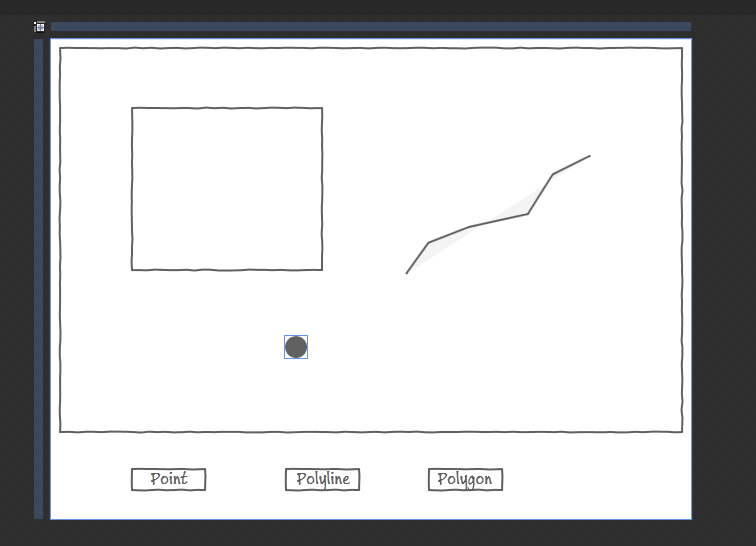
Lägg till knappar i SketchFlow och lägg in dina ny skapade bilder som background på knapparna, resultatet blir då så här:

Använda SketchFlow för att skapa GIS prototyper.

Har suttit och klurat lite på hur man skulle kunna använda Microsoft SketchFlow för att skapa GIS prototyper. Det viktigaste i en sådan prototyp är att man måste kunna beskriva när användaren skapar och jobbar med geometrier i kartan. Eftersom detta skiljer sig mot andra typer av applikationer.

För att illustrera geometrier så kan man göra så här
Linjer kan läggas till genom att använda Pen verktyget:

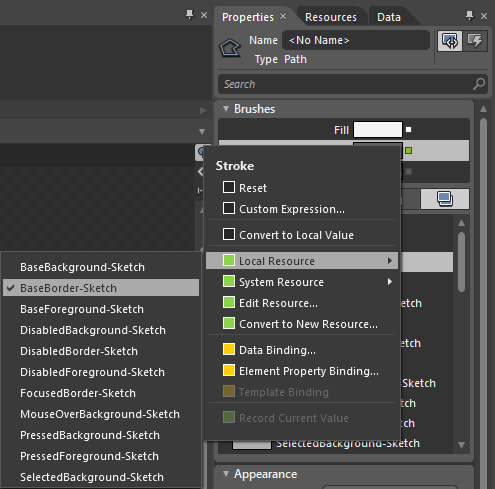
Sen sätter man om den Stroke som används av linjen till Base-Border Sketch:


På samma sätt kan man även göra när det gäller polygoner, men vill man ta en genväg så kan man använda Rectangle Sketch, då slipper man sitta och ändra utseendet på elementen.


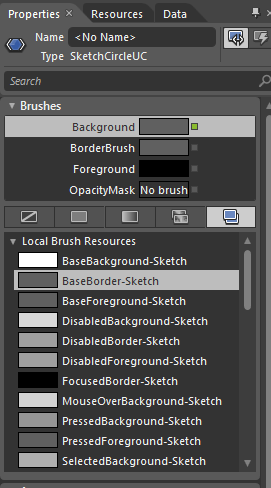
För punkter kan man använda Circle sketch.


Genom att förändra border och background går det att skapa en fylld punkt.


Resultatet blir då:

Thursday, July 01, 2010

Exkludera filer från källkodshantering i Visual Studio.

Är tvungen att kolla upp detta gång på gång, så nu skriver jag upp det i bloggen så kanske jag kommer ihåg det tills nästa gång. Om man vill göra detta i ett vanligt projekt så är det relativt enkelt, gäller bara att komma ihåg att det är under source control i file menyn man ska söka:

1.In Visual Studio, open Solution Explorer and select the file to exclude.

2.On the File menu, click Source Control, then click Exclude from Source Control.

3.When you are ready to place the file under source control, you can access the File menu and click Source Control, then uncheck Exclude from Source Control.

http://msdn.microsoft.com/en-us/library/66tw9ezk(VS.90).aspx

Annat är det med Web sites, här känns det som att källkodshanteringen itne riktigt fungerar på samma sätt, men det går att göra "undo pending changes" på dom filer man inte vill ska läggas till:

Delete files that you want to exclude, add them to were they were again, but do not checkin yet. Then on source control undo pending changes. After that these files would not be source controled items.


http://social.msdn.microsoft.com/Forums/en-US/tfspowertools/thread/f4595ff1-059c-4a33-a3c6-2f22961a73c7

Friday, June 11, 2010

Outlook via HTTP frånkopplad hela tiden i Windows 7.

Har haft problem med att få Outlook att koppla sig till Exchange servern via HTTP enda sen jag installerade om min XP maskin med windows 7. Frågade en kollega och han sa att det var något problem i Vista med RPC och att det var en registernyckel som man skulle ändra. Så jag googlade lite på det och hittade lösningen:
Error messages when you try to connect Outlook 2007 to Exchange Server: "The action cannot be completed" or "Your Microsoft Exchange Server is unavailable" or "Cannot start Microsoft Office Outlook"

Outlook 2007
Click Start, click Run, type regedit in the Open box, and then click OK.
Locate and then click the following subkey:
HKEY_CURRENT_USER\Software\Microsoft\Office\12.0\Outlook\RPC
On the Edit menu, point to New, and then click DWORD Value.
Type DefConnectOpts, and then press ENTER.
Right-click DefConnectOpts, and then click Modify.
In the Value data box, type 0, and then click OK.
Exit Registry Editor.
http://support.microsoft.com/kb/913843/en-us

Saturday, April 17, 2010

VB.Net och Shared Sub Main

Som standard så startas VB.Net applikatioenr via en Main Formulär men ibland vill man lägga in loggning eller liknande direkt när en appliation startar isf att lägga det i Form_Load. Hade problem med att få en VB.Net applikation att starta via Sub Main:

<STAThread()> _
Public Shared Sub Main()

End Sub


Förväntade mig att se den som ett val under properties på appliaktionen men icke:


Visade sig att det krävs att man klickar ur "Enable application framework" för att Sub Main ska komma upp som val i VB.Net.